This Cute Pencil-Style Stylus Is My New Favorite
Disclosure: This post contains affiliate links, which means I may earn a commission if you make a purchase through one of my links, at no additional cost to you. As an Amazon Associate, I earn from qualifying purchases. Please see our full disclosure for more information. The Art Kit participates in the Target Affiliate Marketing Program and Walmart’s affiliate program and may earn commissions from qualifying purchases made through our links. Please note: Always use appropriate supervision and use caution with small pieces. Be sure products and activities are appropriate for your child’s age and skill level.
Some products are cute but not particularly useful. Others work well but look like every other piece of technology you already own.
This pencil-style stylus for iPads somehow manages to be both.
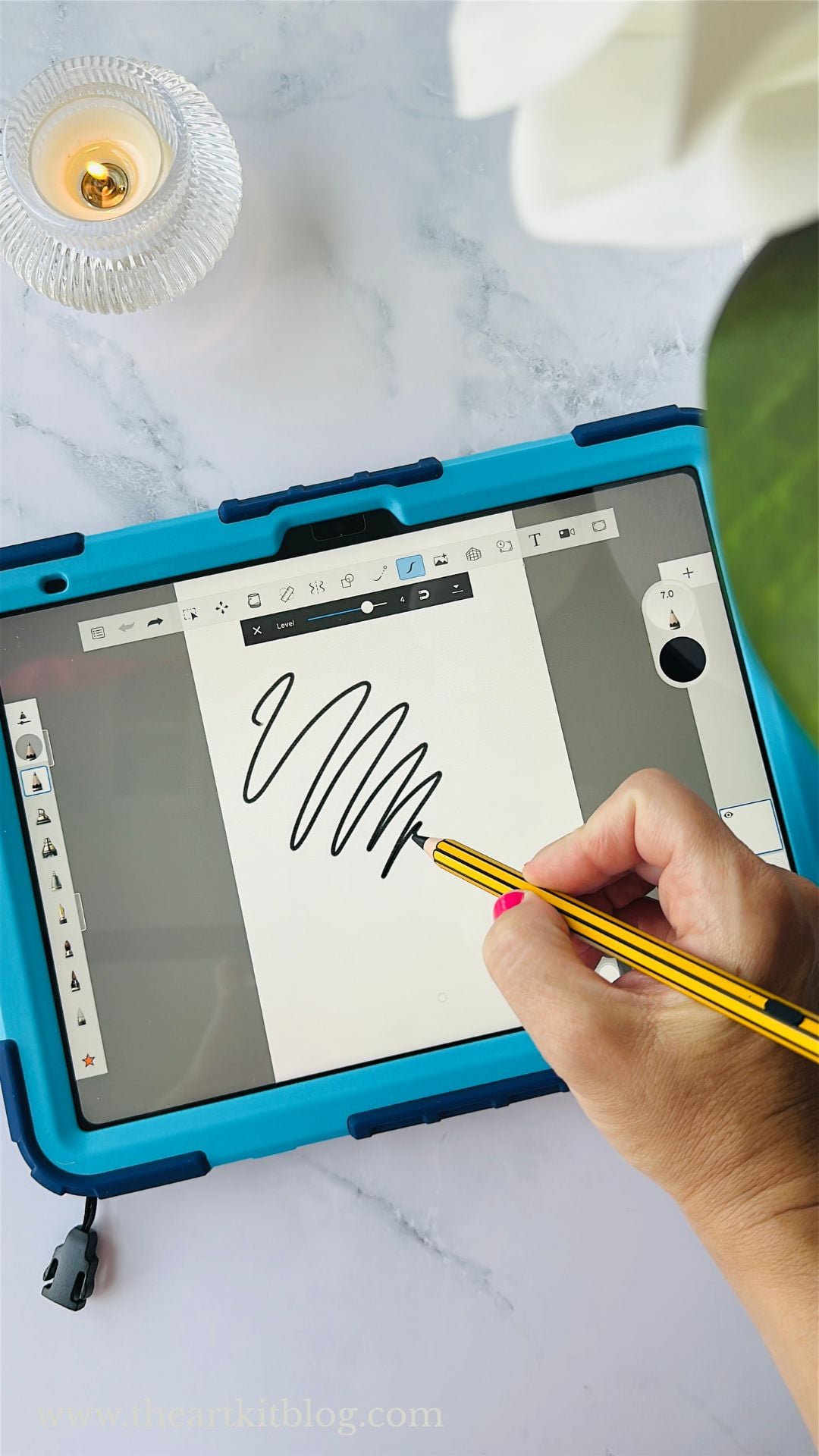
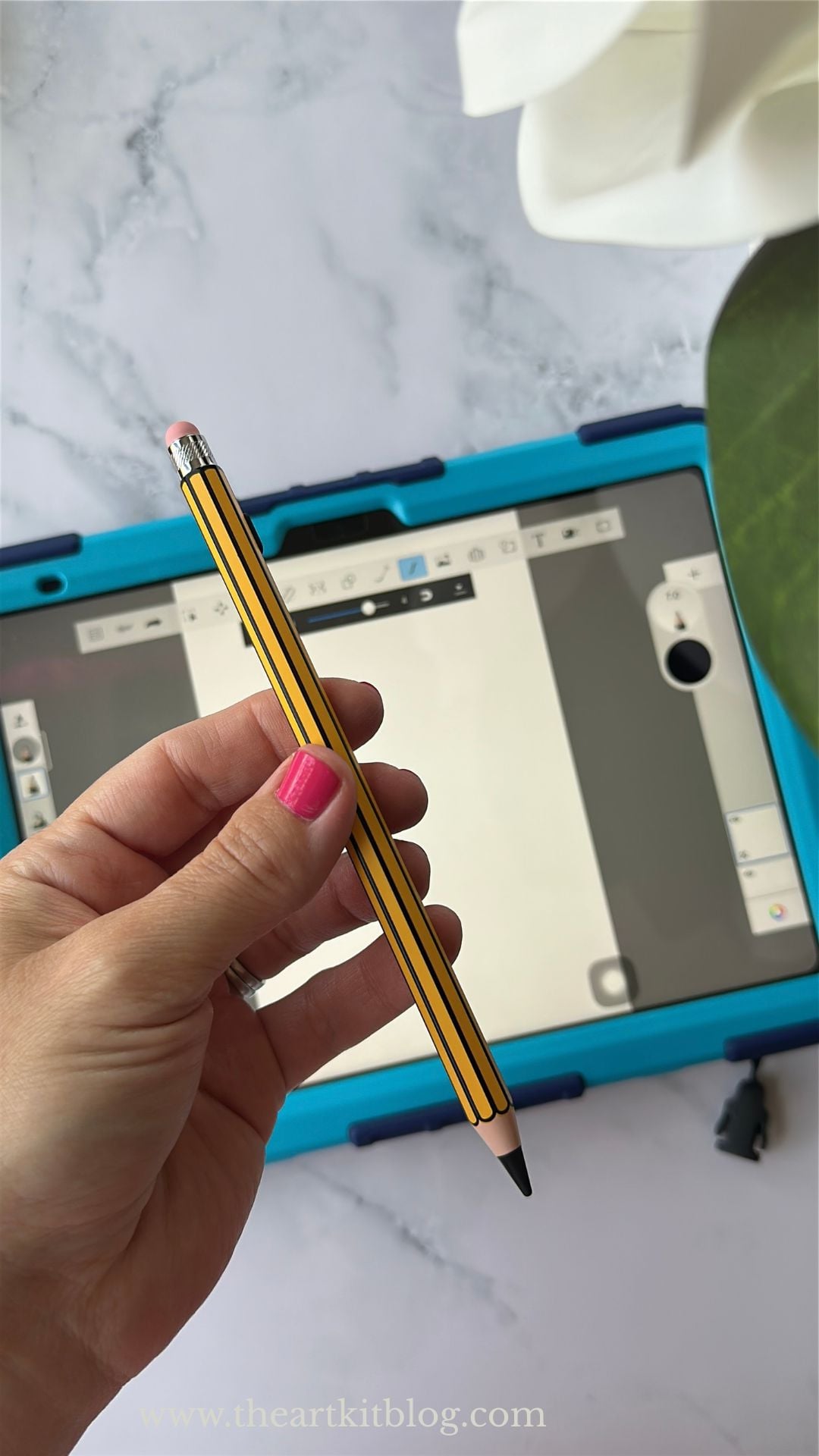
It looks like a classic yellow pencil—complete with a pink “eraser”—but it’s actually a rechargeable stylus designed for writing, drawing, and completing everyday tasks on a compatible iPad.
I’ve tried plenty of pens and little tech accessories, but this one quickly became my favorite. The adorable design initially got my attention, but the fact that it works so well is what made me keep reaching for it.
If you use an iPad for digital planning, drawing, note-taking, school assignments, or everyday tasks, this may be the useful little accessory you didn’t realize you were missing.
Why This Cute Stylus Stands Out
Most styluses are designed to disappear into the background. They’re usually plain, sleek, and decidedly un-pencil-like.
This one is different.
The yellow body, dark pencil tip, and pink rubber end make it look like a traditional pencil. It’s cute enough that children will want to use it, but it doesn’t feel like a toy.
The slim pencil shape feels familiar and comfortable in my hand, and it has worked very well for me. It gives you the fun of an unexpected design without sacrificing the features you actually need from a stylus.
That’s an important distinction because “adorable but annoying to use” is not a category of product I need more of.
No Bluetooth Pairing or App Required
One of the best things about this pencil-style stylus is how easy it is to begin using it.
There is no app to install and no Bluetooth pairing process to complete. You simply press the power button and begin writing on a compatible iPad.
That makes it a particularly convenient option for:
- Children completing digital schoolwork
- Homeschool families using online curriculum
- Teachers marking assignments or creating lessons
- Students taking notes in class
- Parents and children sharing an iPad
- Anyone who doesn’t want another device to configure
If your iPad was previously connected to a different digital pencil, the manufacturer recommends disconnecting that pencil first although I didn't do that and it worked fine for me.
This is the kind of feature that doesn’t sound very exciting until you’re trying to help a child complete an assignment and would prefer not to spend 15 minutes troubleshooting a Bluetooth connection.
It Charges in Approximately 18 Minutes
Forgetting to charge a digital pen usually becomes apparent at the exact moment you need to use it. Apparently, electronics enjoy a little drama.
Fortunately, this stylus charges quickly through a USB-C connection.
It takes approximately 18 minutes to reach a full charge and can provide up to about 12 hours of continuous use. Actual battery life will depend on how the stylus is used, but the short charging time means you shouldn’t have to wait long when the battery runs low.
That makes it easier to use throughout a school day, during a drawing session or while working through digital notes without constantly worrying about the battery.
Plus, you can charge it by plugging it in to your iPad.
Useful for Schoolwork, Notes, Drawing and More
The pencil design makes this stylus especially appealing for school, but it isn’t limited to educational activities.
You can use it for tasks such as:
- Taking handwritten digital notes
- Completing digital worksheets
- Working through online curriculum
- Drawing or sketching
- Practicing handwriting
- Marking or annotating PDFs
- Using a digital planner
- Playing touchscreen games
- Navigating apps and websites
I especially like it for families who use an iPad as part of their homeschool day. A stylus gives children more control than using a finger and makes many digital activities feel more like working with an actual pencil and paper.
It would also be fun to include with an iPad case, digital planner or drawing app as a gift for a student, teacher, artist or homeschool parent.
Palm Rejection Makes Writing Feel More Natural
When we write on paper, we naturally rest part of our hand on the page. Doing that on a touchscreen without palm-rejection technology can cause stray marks or make the screen respond unexpectedly.
This stylus supports palm rejection when used with a compatible iPad, allowing you to rest your hand on the screen more naturally while writing or drawing.
That can make a noticeable difference when taking longer notes, practicing handwriting or completing detailed drawings. Instead of carefully hovering your hand above the screen, you can hold the stylus in a more comfortable writing position.
Tilt Sensitivity for Drawing and Sketching
The stylus also offers tilt sensitivity in compatible apps.
Tilting the pen can help create different line effects while drawing or shading, depending on the app you are using. It won’t automatically turn someone into a professional digital artist—rude, honestly—but it gives casual artists and students more control than they would have when drawing with a finger.
If you primarily want a stylus for notes and schoolwork, the fine active tip is also helpful for making more controlled marks and selecting smaller items on the screen.
The Pink “Eraser” Has a Second Purpose
The pink end resembles the eraser on a traditional pencil, but it is actually a removable rubber capacitive stylus tip.
This rubber end can be used for basic tapping, scrolling, and touchscreen navigation on many devices, including:
- iPhones
- Android phones
- Android tablets
- Microsoft touchscreen devices
- Other capacitive touchscreens
The rubber tip doesn’t provide all the active writing features of the fine tip, but it makes the stylus more versatile. You can use the active end for writing on a compatible iPad and the rubber end for basic navigation on other touchscreen devices.
One important note: the pink end does not automatically erase digital writing. Whether it can be used to erase will depend on the app and the tool you select within that app.
Magnetic Storage Helps Keep It Nearby
Compatible iPad models with side magnetic storage can hold the stylus magnetically.
That makes it much easier to keep the pen and iPad together instead of discovering that your favorite stylus has vanished into the same mysterious location where missing socks apparently live.
The magnetic connection is for carrying and storage only. It does not wirelessly charge the stylus. You will still need to use its USB-C charging connection.
Which iPads Work With This Pencil-Style Stylus?
The manufacturer lists this stylus as compatible with a variety of iPads released from 2018 through 2026, including select models from the following lines:
- iPad 6th through 11th generation
- iPad Air 3rd generation and newer compatible models
- iPad mini 5th through 7th generation
- Compatible 11-inch iPad Pro models
- Compatible 12.9-inch iPad Pro models
- Compatible 13-inch iPad Pro models
You can usually find your model information by opening Settings, selecting General and then choosing About.
What I Like Most About This Stylus
Here’s what made this one my favorite:
- It looks like an adorable traditional pencil.
- It has worked very well for my everyday iPad use.
- It feels natural and comfortable to hold.
- It doesn’t require Bluetooth pairing.
- You don’t need to install an additional app.
- It charges quickly through USB-C.
- It supports palm rejection on compatible iPads.
- It offers tilt sensitivity in compatible apps.
- The rubber end works on other touchscreen devices.
- It attaches magnetically to compatible iPads for storage.
- It’s useful for both children and adults.
I also love that it feels like a genuinely fun find—not just a less expensive version of a plain tech accessory.
A Few Things to Know Before Ordering
No product is right for every person, so there are a few details to keep in mind:
- It is not manufactured by Apple.
- It should not be confused with an Apple Pencil.
- You’ll need to verify compatibility with your exact iPad model.
- Magnetic attachment is available only on compatible iPads.
- The magnetic connection does not charge the stylus.
- The rubber “eraser” end is primarily for basic touchscreen navigation.
- Tilt sensitivity and other functions can vary depending on the app.
- Professional digital artists may want to compare its features with more advanced styluses.
For everyday writing, casual drawing, schoolwork, and digital planning, however, I think it offers a very appealing combination of style, convenience and functionality.
Is This Pencil-Style Stylus Worth Buying?
If you’re looking for a simple stylus that works well without a complicated setup, I think this one is absolutely worth considering.
The pencil design is what makes it stand out, but the convenience is what makes it useful. You can turn it on and begin writing without pairing it through Bluetooth, it charges quickly, and it works for a variety of everyday activities.
It’s especially well suited to:
- Homeschool students
- Teachers
- Children who enjoy digital art
- College students
- Digital planners
- Casual artists
- Anyone who loves cute but practical accessories
This is one of those little products that makes using something you already own more enjoyable. It doesn’t require changing your routine or learning a complicated new system. It simply makes it easier—and a lot more fun—to write, draw, and work on your iPad.
The cute pencil look made me want to try it. How well it works made it my favorite.
You can check the current price, compatibility information and available colors here.
Frequently Asked Questions
Does this stylus require Bluetooth?
No. This pencil-style stylus does not require Bluetooth pairing or an app. Press its power button to begin using it with a compatible iPad.
How quickly does it charge?
The stylus can fully charge through USB-C in approximately 18 minutes.
How long does the battery last?
The product listing states that it can provide up to approximately 12 hours of continuous use after a full charge. Battery life may vary based on use.
Does the pink end work as an eraser?
The pink end is a rubber capacitive stylus tip. It works for basic tapping and navigation on many touchscreen devices, but it does not automatically erase digital writing. Erasing depends on the app and the tool selected within it.
Can it be used with an iPhone?
The active fine tip is intended for compatible iPads. The rubber capacitive end can be used for basic navigation on iPhones and many other touchscreen devices.
Does it work for drawing?
Yes, it can be used for casual drawing and sketching on a compatible iPad. It offers tilt sensitivity in supported apps, although features and results can vary by app.
Does it charge while attached to an iPad?
No. Its magnetic attachment is only for carrying or storing the pen on compatible iPad models. The stylus charges through USB-C.
Is it an Apple Pencil?
No. This is a third-party pencil-style stylus compatible with select iPad models. It is not an Apple Pencil and is not manufactured by Apple.
Would it make a good gift?
Yes. The classic pencil design would make it a fun and practical gift for a student, teacher, homeschooler, digital planner, or anyone who enjoys drawing on an iPad.
This product and review are not affiliated with, sponsored by, or endorsed by Apple Inc.
WANT MORE OF THE GOOD STUFF?
Get my favorite finds, helpful resources, freebies, honest reviews, and deals worth knowing about—straight to your inbox.
Love finding a really good deal? Visit Deals + Finds for things I’d actually buy, recommend, or text a friend about.
And if you’d like to keep up with The Art Kit, you can also find me on Facebook, Instagram, Pinterest, TikTok, and YouTube.
Found this post helpful? Share it with a friend or pin it for later. ♡
💵 Check out our coupon page - we have coupon codes for many shops!

More Current Favorites
- Portland Leather Goods Koala Sling Bag Review: A Surprisingly Roomy Leather Bag
- Portland Leather Goods Metro Crossbody Review: Is This Leather Purse Worth It?
- EverFoams Women’s Fuzzy Slippers Review: I Finally Understand Slipper People
- Project Cloud Carline Clogs Review: I Bought a Second Pair—Are They That Good?